
Audio Player
code 1code 2code 3
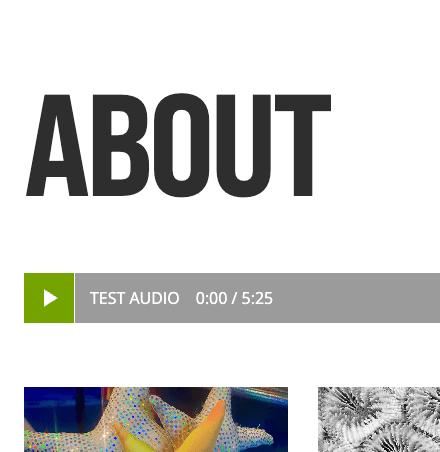
Audio Player is a custom WordPress block that allows you to embed and play audio directly on your website.
It uses Advanced Custom Fields (ACF) to manage audio files and titles, and JavaScript to handle playback, progress tracking, and interactions.
What this block does
-
Plays audio with custom play / pause controls
-
Displays current time and total duration
-
Allows click & drag seeking via a progress bar
-
Ensures only one audio plays at a time
-
Fully reusable — multiple players per page supported
HTML / PHP Block Template
Purpose: Outputs the audio markup and pulls data from ACF.
Required ACF Fields
-
audio_file (File or URL) – required
-
audio_title (Text) – optional
                                                        <?php

/**
 * Block Template.
 *
 * @param   array $block The block settings and attributes.
 * @param   string $content The block inner HTML (empty).
 * @param   bool $is_preview True during AJAX preview.
 * @param   (int|string) $post_id The post ID this block is saved to.
 */

$classes = 'wp-block-audio-player';
$audio = get_field('audio_file'); // URL of the audio
$title = get_field('audio_title'); // optional
if(!$audio) return; ?>
<section class="<?php echo esc_attr( nucleo_block_classes( $classes, $block ) ); ?>">
	<div class="acf-audio-player has-black-background-color has-white-color">
		<div class="acf-audio-player_inner">
			<?php if(!empty($audio)): ?>
				<audio class="audio-element" src="<?php echo esc_url($audio); ?>"></audio>
			<?php endif; ?>
			<button class="audio-toggle">
				<span class="play-icon">
					<svg xmlns="http://www.w3.org/2000/svg" width="30px" height="30px" viewBox="0 0 24 24"><path fill="#fff" d="M8 19V5l11 7z"/></svg>
				</span>
				<span class="pause-icon" style="display:none;">
					<svg xmlns="http://www.w3.org/2000/svg" width="30px" height="30px" viewBox="0 0 24 24"><path fill="#fff" d="M14 19V5h4v14zm-8 0V5h4v14z"/></svg>
				</span>
			</button>
			<?php if(!empty($title)): ?>
				<p class="has-white-text-color mb-0"><?php echo esc_html($title); ?></p>
			<?php endif; ?>
			<span class="audio-current">0:00</span> / <span class="audio-duration">0:00</span>
		</div>
		<div class="audio-progress">
			<div class="audio-progress-bar"></div>
		</div>
	</div>
</section>
Javascript
Purpose: Controls playback, timing, progress bar updates, and interaction logic.
Features handled by JS
- Play / pause toggle
- Auto-pause other players
- Time formatting
- Click & drag seek support
                                                        	document.addEventListener('DOMContentLoaded', () => {
		const players = document.querySelectorAll('.acf-audio-player');
		players.forEach(player => {
			const audio = player.querySelector('.audio-element');
			const toggleBtn = player.querySelector('.audio-toggle');
			const playIcon = toggleBtn.querySelector('.play-icon');
			const pauseIcon = toggleBtn.querySelector('.pause-icon');
			const currentTimeEl = player.querySelector('.audio-current');
			const durationEl = player.querySelector('.audio-duration');
			const progressContainer = player.querySelector('.audio-progress');
			const progressBar = player.querySelector('.audio-progress-bar');
			// Pause other audios when playing
			audio.addEventListener('play', () => {
				players.forEach(p => {
					const a = p.querySelector('.audio-element');
					if (a !== audio) a.pause();
				});
				playIcon.style.display = 'none';
				pauseIcon.style.display = 'inline';
			});
			audio.addEventListener('pause', () => {
				playIcon.style.display = 'inline';
				pauseIcon.style.display = 'none';
			});
			// Toggle button
			toggleBtn.addEventListener('click', () => {
				if(audio.paused) audio.play();
				else audio.pause();
			});
			// Show duration
			audio.addEventListener('loadedmetadata', () => {
				durationEl.textContent = formatTime(audio.duration);
			});
			// Update time and progress bar
			audio.addEventListener('timeupdate', () => {
				currentTimeEl.textContent = formatTime(audio.currentTime);
				progressBar.style.width = (audio.currentTime / audio.duration) * 100 + '%';
			});
			// Seek on click or drag
			let isDragging = false;
			const seek = e => {
				const rect = progressContainer.getBoundingClientRect();
				let x = e.clientX - rect.left;
				x = Math.max(0, Math.min(x, rect.width)); // clamp
				audio.currentTime = (x / rect.width) * audio.duration;
			};
			// Click to seek
			progressContainer.addEventListener('click', seek);
			// Drag to seek
			progressContainer.addEventListener('mousedown', e => { isDragging = true; seek(e); });
			window.addEventListener('mousemove', e => { if(isDragging) seek(e); });
			window.addEventListener('mouseup', () => { isDragging = false; });
			function formatTime(time) {
				const minutes = Math.floor(time / 60);
				const seconds = Math.floor(time % 60);
				return minutes + ':' + (seconds < 10 ? '0' : '') + seconds;
			}
		});
	});
Styles (SCSS / CSS)
Purpose: Controls layout, colors, progress bar visuals, and interaction layers.
                                                        .wp-block-audio-player{
	.acf-audio-player {
		width: 100%;
		position: relative;
		background: #7F7F7F;
		overflow: hidden;
        &_inner{
            z-index: 9;
            width: max-content; /* shrink exactly to its content */
            display: flex;
            justify-content: flex-start;
            align-items: center;
            position: relative;
            text-transform: uppercase;
            pointer-events: none;
            left: 0; /* align to left */
            > * {
                pointer-events: auto; /* inner buttons/text are still clickable */
            }
            p{
                margin: 0 1rem;
            }
        }
	}
	.audio-toggle {
		width: 50px;
		height: 50px;
		display: flex;
		align-items: center;
		justify-content: center;
		cursor: pointer;
		background: #74a300;
		color: #fff;
		border: none;
		flex-shrink: 0; /* prevent shrinking */
        .pause-icon {
            display: none;
        }
	}
	.audio-progress {
		width: 100%;
		height: 100%;
		background: #9b9b9bff;
		position: absolute;
		top: 0;
		left: 0;
		cursor: pointer;
		border-radius: 0;
        &-bar {
            height: 100%;
            width: 0;
            background: #2E2F2F;
            border-radius: 0;
            margin-left: 50px;
            border-left:1px solid #fff;
        }
	}
}